Date-Format

背景

项目中经常出现格式化时间的情况,比如页面中时间展示或者做为接口参数传递等

时间对象提供了大量的获取日期时间的方法,利用已有方法接口封装好一个格式化方法做为时间对象的原型方法,可以大大方便相关编程

代码

1
2
3
4
5
6
7
8
9
10
11
12
13
14
15
16
17
18
19
20
21
22
23
24
25
26
27
28
29
30
31
32
33
Date.prototype.Format = function (fmt) {
var o = {
'M+' : this.getMonth() + 1, //月,占位1-2位
'd+' : this.getDate(), //日,占位1-2位
'H+' : this.getHours(), //时,占位1-2位
'm+' : this.getMinutes(), //分,占位1-2位
's+' : this.getSeconds(), //秒,占位1-2位
'S' : this.getMilliseconds(), //毫秒,占位1位,1-3位数字(不存在前面加零,取到啥值是啥值)
'q+' : Math.floor((this.getMonth() + 3)/3) //季度,占位1-2位
}
var week = {
"0" : "\u65e5",
"1" : "\u4e00",
"2" : "\u4e8c",
"3" : "\u4e09",
"4" : "\u56db",
"5" : "\u4e94",
"6" : "\u516d"
}
if (/(y+)/.test(fmt)) {
fmt = fmt.replace( RegExp.$1, (this.getFullYear() + '').substr( 4 - RegExp.$1.length) )
}
for (var k in o) {
if (new RegExp('(' + k + ')').test(fmt) ) {
fmt = fmt.replace(RegExp.$1, (RegExp.$1.length === 1) ? (o[k]) : (("00" + o[k]).substr(("" + o[k]).length)))
}
}
if (/(E+)/.test(fmt)) {
fmt = fmt.replace(RegExp.$1, ((RegExp.$1.length > 1) ? (RegExp.$1.length > 2 ? "\u661f\u671f": "\u5468") : "") + week[this.getDay() + ""])
}
return fmt
}
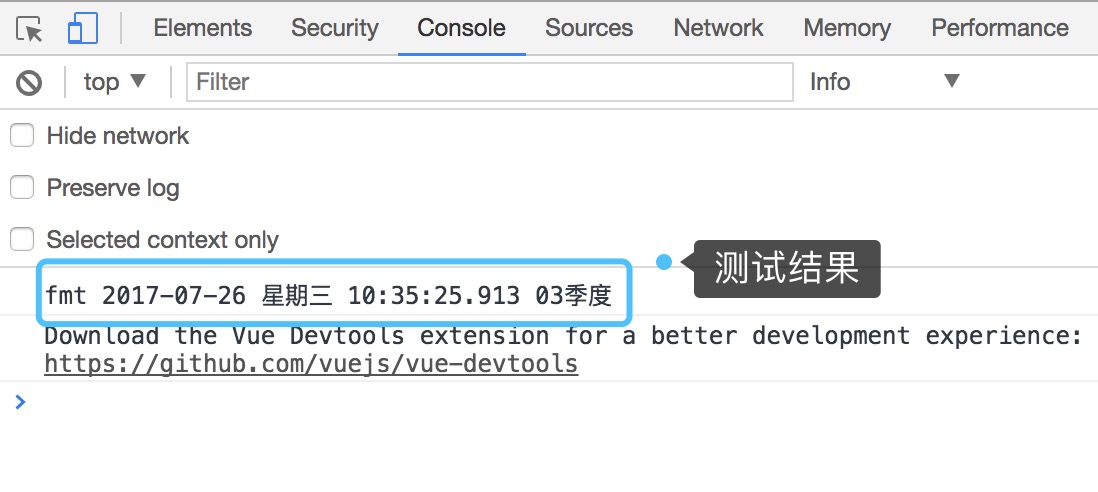
console.log('fmt',new Date().Format('yyyy-MM-dd EEE HH:mm:ss.S qq季度'))

测试结果