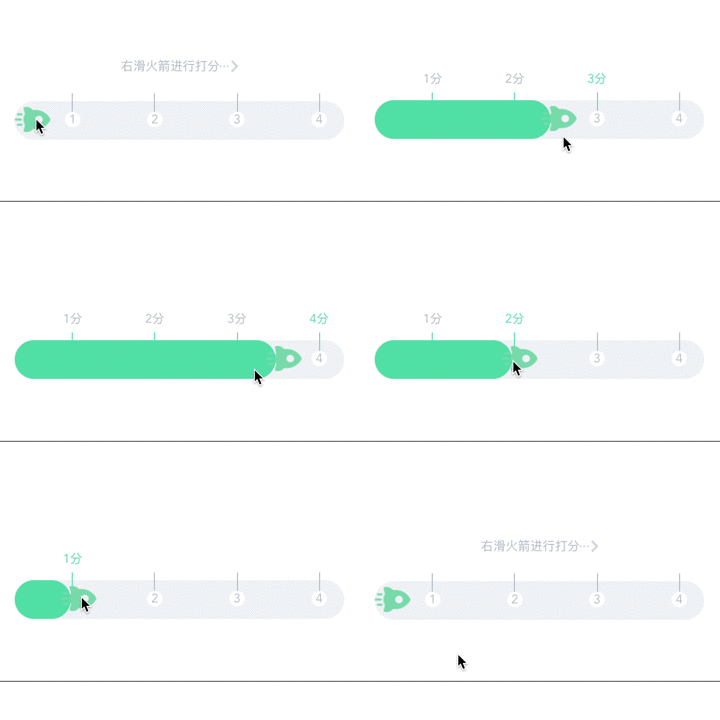
滑动打分小组件

背景

已经一个月没写博客了,赶了很多项目,踩了很多坑,也有很多经验需要总结


此篇想根据实际的开发需求总结下touch系列事件,完成一个滑动打分的功能,实际开发太赶,做完都没时间封装一下就开始下一个项目,所以最后把这个功能封装成个小组件,以后有类似的功能可以直接拿来改

概要梳理
需求是拖动火箭来打分,那肯定要用到touch事件,大致的情况是touchstart阶段计算手指触摸点和火箭原位置的距离,touchmove阶段是火箭随手动,需要用到translate3d改变火箭的位置,touchend阶段保存火箭的最终位置。

细节部分需要考虑不能拖出到规定区域的外面,所以在touchmove时判断火箭位置有没有超出范围,给定最左最右的位置限制,以及既然是打分功能,给了明确的分数刻度,肯定不允许滑动火箭最终停在非刻度位置,所以在touchend需要做吸附效果,将火箭定位到最接近的刻度位置。

其它的就是刻度线样式更改之类的

实际开发

先提出来架子~~,先不管高度的部分,固定写死了高度

1
2
3
4
5
6
7
8
9
10
11
12
13
14
15
16
17
18
19
20
21
22
23
24
25
26
27
28
29
30
31
32
33
34
35
36
37
38
39
40
41
42
43
44
45
46
47
48
49
50
51
52
53
54
55
56
57
58
59
60
61
62
63
64
65
66
67
68
<template>
<div>
<p>{{this.X}}</p>
<div class="touchBlock" ref="div" @touchstart.prevent="ts" @touchmove.prevent="tm" @touchend.prevent="te"></div>
</div>
</template>
<style scoped>
.touchBlock{
background-color:#ff0000;
width:50px;
height:50px;
border-radius:50%;
transform: translate3d(40px,120px,0)
}
p{
position:absolute;
top:0;
left:0;
}

</style>
<script>
export default{
data(){
return {
//点和触摸点距离
sx:0,
sy:0,
//点的位置
cx:0,
cy:0,
//滑动范围宽度,这里先直接就是屏幕的宽度了
width:0,
//移动距离
X:40
}
},
mounted: function(){
this.width = document.body.clientWidth;
},
methods:{
ts:function(e){
this.sx=e.touches[0].pageX-this.cx;
},
tm:function(e){
var X = e.touches[0].pageX-this.sx;
if (X<40) {
X = 40;
}
if (X>this.width-100) {
X = this.width - 100;
}
this.$refs.div.style.webkitTransform='translate3d('+X+'px,'+'120px,0)';
this.X = X;
},
te:function(e){
//随便先写个吸附
if (100<this.X && this.X<150) {
const X = 150;
this.$refs.div.style.webkitTransform='translate3d('+X+'px,'+'120px,0)';
this.X = 150;
}
//保留点的最终位置
this.cx = this.X;
}
}
}
</script>

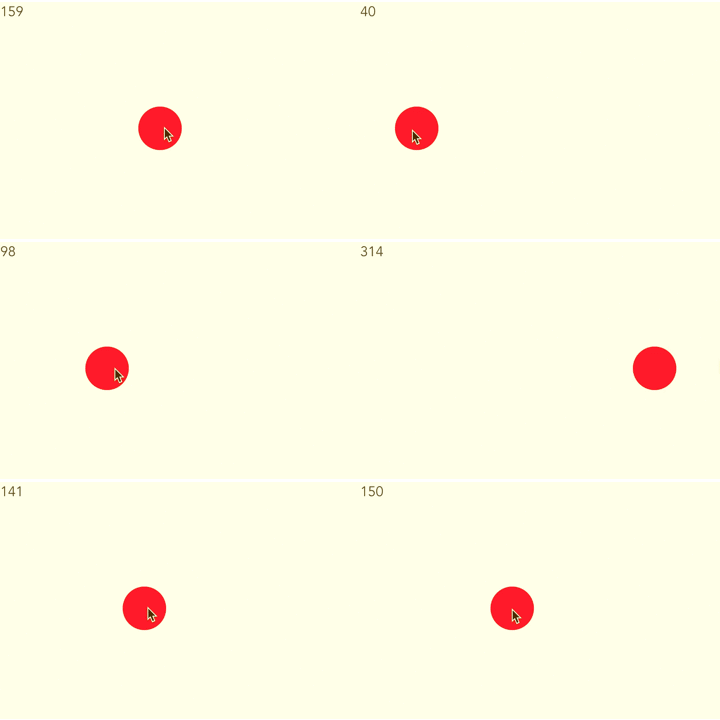
效果如下:

起初在touchend里面去重新获取了触摸点最后离开的位置来计算cx即原点的最终位置,这样做要注意touchend触发时touches里面已经没有信息,需要在chengedTouches里面取pageX,但其实并不需要在touchend时重新计算cx,touchmove中的X就是最终cx的位置!!

主要干路通了,添加样式,稍微注意下哪些是属于可以更改的数据,在封装起来后这些数据需要父组件提供

1
2
3
4
5
6
7
8
9
10
11
12
13
14
15
16
17
18
19
20
21
22
23
24
25
26
27
28
29
30
31
32
33
34
35
36
37
38
39
40
41
42
43
44
45
46
47
48
49
50
51
52
53
54
55
56
57
58
59
60
61
62
63
64
65
66
67
68
69
70
71
72
73
74
75
76
77
78
79
80
81
82
83
84
85
86
87
88
89
90
91
92
93
94
95
96
97
98
99
100
101
102
103
104
105
106
107
108
109
110
111
112
113
114
115
116
117
118
<template>
<div class="example">
<p class='slider_em' v-show="!score_start"><span>右滑火箭进行打分</span><img src="/static/img/slider.png"></p>
<div v-show='score_start' class='score_start'>
<ul>
<li v-for="(item,key) in scores" v-show="scoring_option>=scores[key]" :class="[scoring_option==scores[key] ? 'scoring' : '']" :style="liStyle">{{item}}分</li>
</ul>
</div>
<div class='slider' ref='sliderRef'>
<ul>
<li v-for="(item,key) in scores" :style="liStyle"><span :class="[scoring_option>=scores[key] ? 'active_line' : '', 'slider_line']"></span><span class='slider_num'>{{item}}</span></li>
</ul>
<div ref='progress_bar' class='progress'></div>
<img ref='rocket_img' class='rocket' v-bind:src="rocket_img==1?'/static/img/rocket1.png':'/static/img/rocket3.png'" @touchstart.prevent="ts" @touchmove.prevent="tm" @touchend.prevent="te">
</div>
</div>
</template>
<style scoped>
.example{
width: 95%;
margin: 0 auto;
}
p.slider_em{
color: #b6bdcb;
font-size: .8rem;
text-align: center;
margin-top: 1.333rem;
margin-bottom: 1.667rem;
}
p.slider_em span{
vertical-align: middle;
}
p.slider_em img{
height: .75rem;
width: auto;
vertical-align: middle;
}
.slider{
height: 2.5rem;
background-color: #f0f2f5;
border-radius: 1.25rem;
text-align: center;
position: relative;
margin: 0 .5rem;
}
.slider ul{
position: relative;
width: 100%;
left: 5%;
}
.slider li{
display: inline-block;
height: 2.5rem;
line-height: 2.5rem;
margin-top: -.5rem;
}
span.slider_line{
display: block;
width: 1px;
height: 1.2rem;
background-color: #b6bdcb;
margin: 0 auto;
}
span.slider_num{
display: block;
width: 1rem;
height: 1rem;
background-color: #fff;
border-radius: 50%;
color: #b6bdcb;
font-size: .8rem;
line-height: 1rem;
margin: 0 auto;
}
.progress{
position: absolute;
left: 0;
top: 0;
width: 0;
height: 2.5rem;
background-color: #51ddab;
border-radius: 1.25rem;
}
.rocket{
position: absolute;
left: 0;
top: .4rem;
height: 1.65rem;
width: auto;
}
.score_start{
position: relative;
margin:0 .5rem;
height: 18px;
margin-top: 2rem;
margin-bottom: 1rem;
}
.score_start ul{
width: 100%;
height: 16.995px;
position: absolute;
top: 0;
left: 5%;
}
.score_start ul li{
display: inline-block;
font-size: .8rem;
color: #b6bdcb;
text-align: center;
}
.score_start ul li.scoring{
color: #51ddab;
}
span.slider_line.active_line{
background-color: #51ddab;
}

</style>

以上是基本样式内容,直接拷贝了已有项目,稍有改动的是scores数组要从父组件传过来, li的宽度应该是随着分数数组数量来决定的,我直接作为内联样式从父组件传过来,本来还打算颜色也是传递过来的,但是发觉火箭是图片啊,不是光改颜色就能更改整体颜色风格的,火箭也是要一起改的,所以暂时没传递

js部分无大改动,在data里面增加了一些判断字段,再加入props数据,以及这次不是直接取body的宽度,取了slider容器的宽度,还有就是最左最右的移动距离限制,因为是绝对定位,高度一直都是0就好,最左也是0,最右是容器的宽度-火箭的宽度,最后在做火箭随手动的部分,还要加个进度条的部分也跟着滑过来。代码如下:

1
2
3
4
5
6
7
8
9
10
11
12
13
14
15
16
17
18
19
20
21
22
23
24
25
26
27
28
29
30
31
32
33
34
35
36
37
38
39
40
41
42
43
44
45
46
47
48
49
50
51
52
53
54
55
56
57
58
59
60
61
62
63
64
<script>
export default{
data(){
return {
//点和触摸点距离
sx:0,
sy:0,
//点的位置
cx:0,
cy:0,
//滑动范围宽度,这里先直接就是屏幕的宽度了
width:0,
//移动距离
X:40,
//是否有分数标志
score_start: false,
//当前分数
scoring_option: 0,
//火箭切换标志,1是绿色3是白色
rocket_img: 1
//需要props传递的信息
}
},
props: ['scores','liStyle'],
mounted: function(){
//获取滑动区域的宽度
this.width = this.$refs.sliderRef.clientWidth;
},
methods:{
ts:function(e){
this.sx=e.touches[0].pageX-this.cx;
this.sy=e.touches[0].pageY-this.cy;
},
tm:function(e){
var X = e.touches[0].pageX-this.sx;
if (X<0) {
X = 0;
}
//37是火箭的宽度
if (X>this.width-37) {
X = this.width-37;
}
this.$refs.rocket_img.style.webkitTransform='translate3d('+
X+'px,'+'0,0)';
this.$refs.progress_bar.style.width=X+10+'px';
this.X = X;
},
te:function(e){
//随便先写个吸附
if (100<this.X && this.X<150) {
const X = 150;
this.$refs.rocket_img.style.webkitTransform='translate3d('+
X+'px,'+'0,0)';
this.$refs.progress_bar.style.width=X+10+'px';
this.X = 150;
}
//保留点的最终位置
this.cx = this.X;

}
}

}
</script>

父组件引用直接在router-view里面了,正常应该肯定不是路由跳转一个组件就这么个内容,应该是import引用组件过来展示的,偷懒了,大概看下父组件是需要传递过去数据的:

1
2
3
4
5
6
7
8
9
10
11
12
13
14
15
16
17
18
19
<template>
<div id="app">
<router-view :scores='scores' :liStyle='liStyle'></router-view>
</div>
</template>

<script>
export default {
name: 'app',
data: function () {
return {
//分数数组
scores: [1,2,3,4,5],
//li宽度跟随分数数量
liStyle: {width: '20%'}
}
}
}
</script>

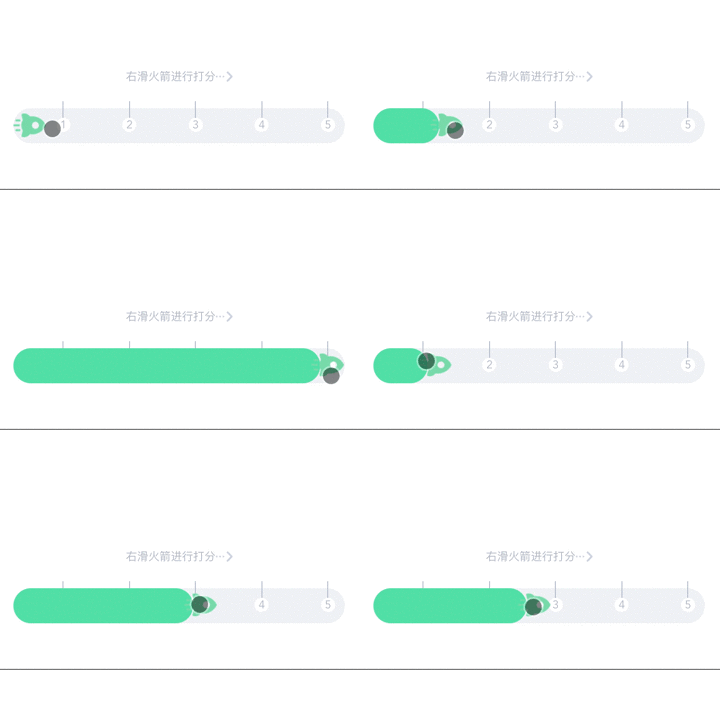
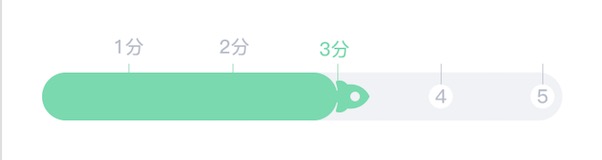
现在效果是火箭跟着触摸点在固定区域左右滑动了,如下图

接下来做分数吸附效果,需要计算

我做的吸附功能分了几个区域,然后在touchend时判断火箭的头部在哪个区域,属于哪个区域就将其定位到此区域,例子图如下
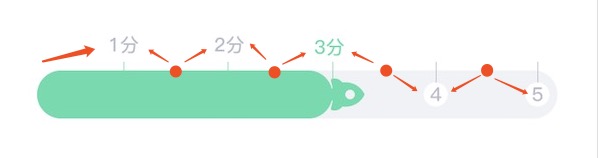
关于计算画了个草稿:
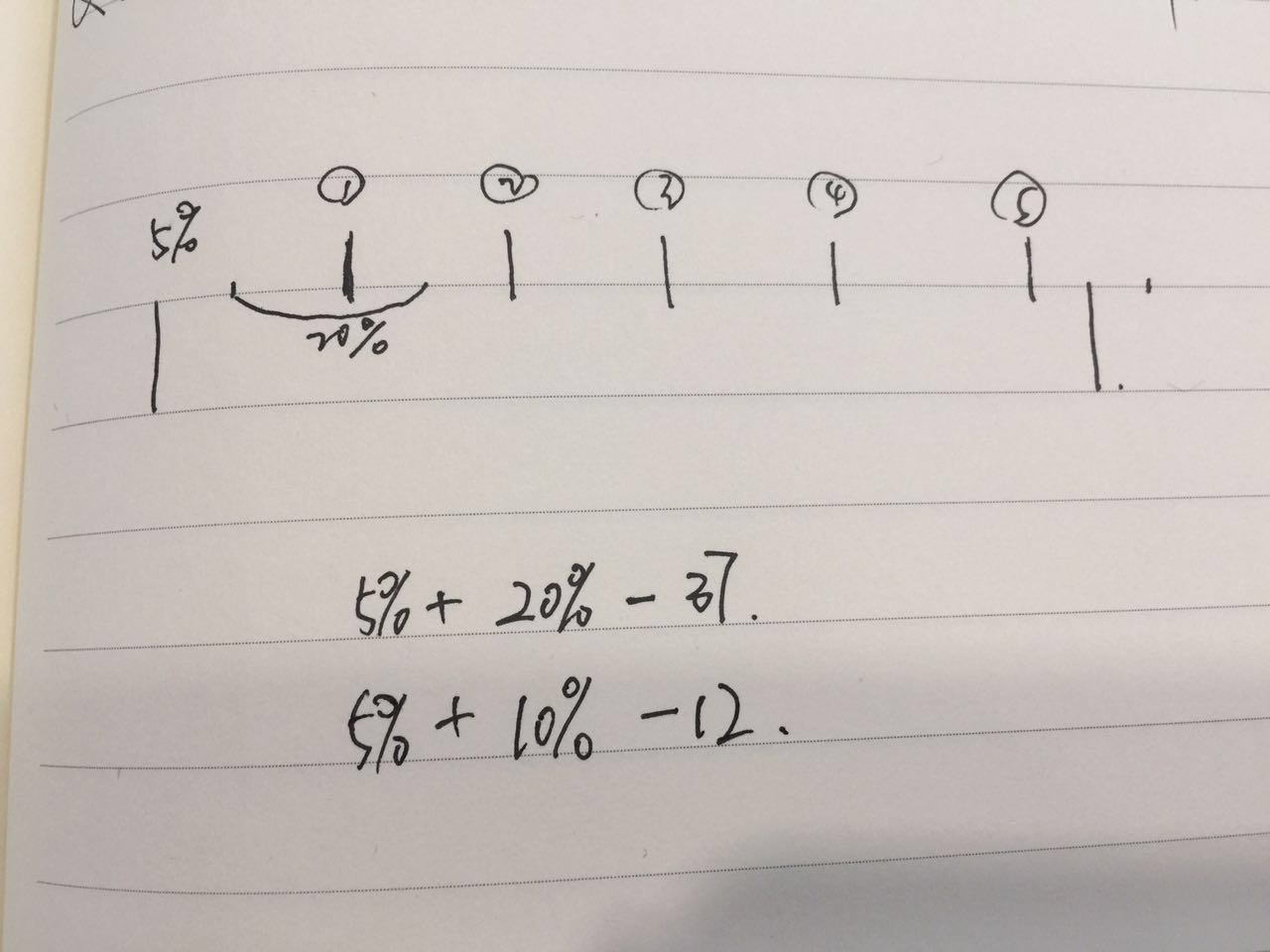
首先分数刻度部分已经相对火箭滑动区域右移了5%,所以在父组件传递过来的百分比基础上还要加上5%,比如现在的例子是5个分数段,父组件传过来20%,那么火箭移动位置到区域宽度的25%刚好是火箭尾部在1分和2分的中间位置,想要的效果是以火箭的头部做为边界标准,所以在此基础上需要减掉火箭的宽度,所以首先就计算出1分区域的范围是this.width*0.25-37,往后类推就依次增加20%

在这个范围内的都定位到1分的位置,1分的位置就是少了10%,然后定位的话是以火箭放火的那个部位为基准定位,所以只减去火焰的部分,大概是12px,这个火箭的宽度都是一开始确定了火箭图片的大小了,所以计算出火箭定位到1分的位置是this.width*0.15-12,同样往后类推就依次增加20%

需要解决的问题是,现在分析出来的是固定了5个刻度分数的情况,需要从父组件传递过来,用于计算位置的百分比小数形式哒,这个好解决,但是判断条目不知道不方便做区域判断,唯一能知道的是父组件传过来的分数数组,只能做个循环

touchend更改的代码如下:

1
2
3
4
5
6
7
8
9
10
11
12
13
14
15
16
17
18
19
20
21
22
23
24
25
26
27
28
29
30
31
32
33
34
35
36
37
38
39
40
41
42
<script>
methods:{
te:function(e){
//父组件传递过来的百分比-小数点形式
var per = this.percent;
//没有分数
if (this.X==0) {
this.$refs.rocket_img.style.webkitTransform='translate3d(0,0,0)';
this.$refs.progress_bar.style.width='0px';
//保留点的最终位置
this.cx = this.X;
return;
}
for (var i = 0; i < this.scores.length; i++) {
//特殊处理第一个分数
if (this.X>0&&this.X<=this.width*(0.05+per)-37) {
var X = this.width*(0.05+per/2)-12;
this.$refs.rocket_img.style.webkitTransform='translate3d('+X+'px,'+'0,0)';
this.$refs.progress_bar.style.width=X+10+'px';
this.X = X;
//保留点的最终位置
this.cx = this.X;
return;
}
//其他分数段判断通用
if (this.width*(0.05+i*per)-37<this.X && this.X<=this.width*(0.05+(i+1)*per)-37) {
var X = this.width*((0.05+per/2)+i*per)-12;
//最后一个分数特殊处理避免溢出
if (i==this.scores.length-1) {
X = this.width - 37;
}
this.$refs.rocket_img.style.webkitTransform='translate3d('+X+'px,'+'0,0)';
this.$refs.progress_bar.style.width=X+10+'px';
this.X = X;
//保留点的最终位置
this.cx = this.X;
return;
}
}
}
}
</script>

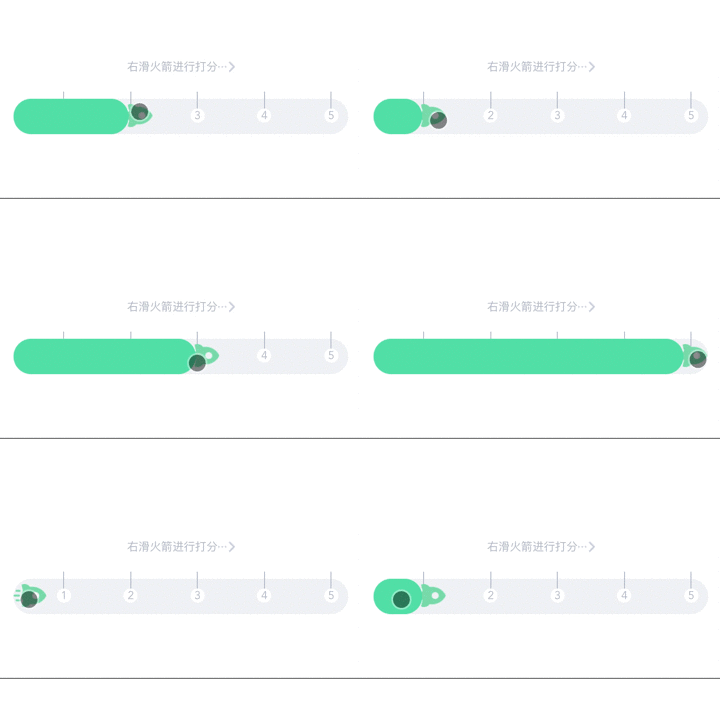
还是上效果图吧!

解释下定位计算部分,一开始我考虑的是应该要在for循环里特殊对第一个分数和最后一个分数做处理,因为区域范围判断不等同于中间位置,but!!!仔细一想好像也不用,首先第一个位置正确的范围应该是this.X>0 && this.X<this.width*0.25-37,而中间通用的分数范围是this.X>this.width*(0.05+i*per)-37 && this.X<this.width*(0.05+(i+1)*per)-37,那么当i是0也就是第一个分数的时候,就变成了this.X>this.width*0.05-37 && this.X<this.width*0.25-37,第一个想法是这个判断区域的左区间是个负数哎,那么直接包含了this.X>0 && this.X<this.width*0.25-37呀,然后0的情况也就是没有分数的情况在for循环之前就截住判断了,所以第一个分数可以用通用的方法哎,四不四傻,怎么可能this.width*(0.05+i*per)-37一定是个负数呢,当this.width大于740px的时候就是正数了哦,那么这个正数之前至0的区间就会漏掉,所以第一个分数不能用通用的方法!!!!!!

最后一个分数倒是可以用在通用方法里,首先区域的左区间是一样的,由于右移了5%所以右区间是溢出了火箭的规定区域的,所以范围是包含的,不过火箭要吸附的位置就不一样了,按照通用的方法是在分数位置偏右一点(就是火箭火焰的距离),有可能会溢出规定的区域,所以最后一个分数吸附的位置不按照通用的方法,直接吸附在规定区域的最右就可以了

至此,主要的大功能完成啦!!!

后面补充上刻度颜色变化之类的细节,刻度改变以及上面分数的显隐在touchmove里面也是需要做循环判断区域,直接延用上面循环的思路

!!!!有一个重要的改动是之前我忽略了,分数刻度右移的部分,一直是默认5%的距离,但是这个想要适应各种长度的分数数组明显是不行的,对于比较多的分数会有溢出的情况,比较少的分数右侧又会空隙太大,所以这个得根据每个分数的宽度比例来变,我只是取了个大概是分数宽度的1/5,这个倒是可以根据具体有多少分数适当调整,所以同样也是做为父组件需要传递的参数

最终的代码如下:

1
2
3
4
5
6
7
8
9
10
11
12
13
14
15
16
17
18
19
20
21
22
23
24
25
26
27
28
29
30
31
32
33
34
35
36
37
38
39
40
41
42
43
44
45
46
47
48
49
50
51
52
53
54
55
56
57
58
59
60
61
62
63
64
65
66
67
68
69
70
71
72
73
74
75
76
77
78
79
80
81
82
83
84
85
86
87
88
89
90
91
92
93
94
95
96
97
98
99
100
101
102
103
104
105
106
107
108
109
110
111
112
113
114
115
116
117
118
119
120
121
122
123
124
125
126
127
128
129
130
131
132
133
134
135
136
137
138
139
140
141
142
143
144
145
146
147
148
149
150
151
152
153
154
155
156
157
158
159
160
161
162
163
164
165
166
167
168
169
170
171
172
173
174
175
176
177
178
179
180
181
182
183
184
185
186
187
188
189
190
191
192
193
194
195
196
197
198
199
200
201
202
203
204
205
206
207
208
209
210
211
212
213
214
215
216
217
218
219
220
221
222
223
224
225
226
227
228
229
230
231
232
233
234
235
236
<template>
<div class="example">
<p class='slider_em' v-show="!score_start"><span>右滑火箭进行打分</span><img src="/static/img/slider.png"></p>

<div v-show='score_start' class='score_start'>
<ul>
<li v-for="(item,index) in scores" v-show="scoring_option>=scores[index]" :class="[scoring_option==scores[index] ? 'scoring' : '']" :style="liStyle">{{item}}分</li>
</ul>
</div>

<div class='slider' ref='sliderRef'>
<ul :style="left">
<li v-for="(item,index) in scores" :style="liStyle"><span :class="[scoring_option>=scores[index] ? 'active_line' : '', 'slider_line']"></span><span class='slider_num'>{{item}}</span></li>
</ul>
<div ref='progress_bar' class='progress'></div>
<img ref='rocket_img' class='rocket' v-bind:src="rocket_img==1?'/static/img/rocket1.png':'/static/img/rocket3.png'" @touchstart.prevent="ts" @touchmove.prevent="tm" @touchend.prevent="te">
</div>
</div>
</template>

<script>
export default{
data(){
return {
//点和触摸点距离
sx:0,
sy:0,
//点的位置
cx:0,
cy:0,
//滑动范围宽度,这里先直接就是屏幕的宽度了
width:0,
//移动距离
X:40,
//是否有分数标志
score_start: false,
//当前分数
scoring_option: 0,
//火箭切换标志,1是绿色3是白色
rocket_img: 1
//需要props传递的信息
}
},
props: ['scores','liStyle','percent', 'left'],
mounted: function(){
//获取滑动区域的宽度
this.width = this.$refs.sliderRef.clientWidth;
},
methods:{
ts:function(e){
this.sx=e.touches[0].pageX-this.cx;
this.sy=e.touches[0].pageY-this.cy;
},
tm:function(e){
//父组件传递过来的百分比-小数点形式
var per = this.percent;
this.rocket_img = 1;
var X = e.touches[0].pageX-this.sx;
if (X<=0) {
X = 0;
this.$nextTick(function(){
this.score_start = false;
this.scoring_option = 0;
})
}
//37是火箭的宽度
if (X>this.width-37) {
X = this.width-37;
}
this.$refs.rocket_img.style.webkitTransform='translate3d('+X+'px,'+'0,0)';
this.$refs.progress_bar.style.width=X+10+'px';
this.X = X;

for (var i = 0; i < this.scores.length; i++) {
//特殊处理第一个分数
if (this.X>0&&this.X<=this.width*(per/5+per)-37) {
this.score_start = true;
this.scoring_option = this.scores[0];
return;
}
//其他分数段判断通用
if (this.width*(per/5+i*per)-37<this.X && this.X<=this.width*(per/5+(i+1)*per)-37) {
this.score_start = true;
this.scoring_option = this.scores[i];
return;
}
}
},
te:function(e){
//父组件传递过来的百分比-小数点形式
var per = this.percent;
//没有分数
if (this.X==0) {
this.$refs.rocket_img.style.webkitTransform='translate3d(0,0,0)';
this.$refs.progress_bar.style.width='0px';
//保留点的最终位置
this.cx = this.X;
return;
}
for (var i = 0; i < this.scores.length; i++) {
//特殊处理第一个分数
if (this.X>0&&this.X<=this.width*(per/5+per)-37) {
var X = this.width*(per/5+per/2)-12;
this.$refs.rocket_img.style.webkitTransform='translate3d('+X+'px,'+'0,0)';
this.$refs.progress_bar.style.width=X+10+'px';
this.X = X;
//保留点的最终位置
this.cx = this.X;
return;
}
//其他分数段判断通用
if (this.width*(per/5+i*per)-37<this.X && this.X<=this.width*(per/5+(i+1)*per)-37) {
var X = this.width*((per/5+per/2)+i*per)-12;
var P = X;
//最后一个分数特殊处理避免溢出
if (i==this.scores.length-1) {
X = this.width - 37;
P = this.width - 10;
this.rocket_img = 3;
}
this.$refs.rocket_img.style.webkitTransform='translate3d('+X+'px,'+'0,0)';
this.$refs.progress_bar.style.width=P+10+'px';
this.X = X;
//保留点的最终位置
this.cx = this.X;
return;
}
}

}
}

}
</script>

<style scoped>
.example{
width: 95%;
margin: 0 auto;
}
p.slider_em{
color: #b6bdcb;
font-size: .8rem;
text-align: center;
margin-top: 1.333rem;
margin-bottom: 1.667rem;
}
p.slider_em span{
vertical-align: middle;
}
p.slider_em img{
height: .75rem;
width: auto;
vertical-align: middle;
}
.slider{
height: 2.5rem;
background-color: #f0f2f5;
border-radius: 1.25rem;
text-align: center;
position: relative;
margin: 0 .5rem;
}
.slider ul{
position: relative;
width: 100%;
left: 5%;
}
.slider li{
display: inline-block;
height: 2.5rem;
line-height: 2.5rem;
margin-top: -.5rem;
}
span.slider_line{
display: block;
width: 1px;
height: 1.2rem;
background-color: #b6bdcb;
margin: 0 auto;
}
span.slider_num{
display: block;
width: 1rem;
height: 1rem;
background-color: #fff;
border-radius: 50%;
color: #b6bdcb;
font-size: .8rem;
line-height: 1rem;
margin: 0 auto;
}
.progress{
position: absolute;
left: 0;
top: 0;
width: 0;
height: 2.5rem;
background-color: #51ddab;
border-radius: 1.25rem;
}
.rocket{
position: absolute;
left: 0;
top: .4rem;
height: 1.65rem;
width: auto;
}
.score_start{
position: relative;
margin:0 .5rem;
height: 18px;
margin-top: 2rem;
margin-bottom: 1rem;
}
.score_start ul{
width: 100%;
height: 16.995px;
position: absolute;
top: 0;
/*left: 5%;*/
}
.score_start ul li{
display: inline-block;
font-size: .8rem;
color: #b6bdcb;
text-align: center;
}
.score_start ul li.scoring{
color: #51ddab;
}
span.slider_line.active_line{
background-color: #51ddab;
}

</style>

父组件引用的代码:

1
2
3
4
5
6
7
8
9
10
11
12
13
14
15
16
17
18
19
20
21
22
23
<template>
<div id="app">
<router-view :scores='scores' :liStyle='liStyle' :percent='percent' :left="left"></router-view>
</div>
</template>

<script>
export default {
name: 'app',
data: function () {
return {
//分数数组
scores: [1,2,3,4,5],
//li宽度跟随分数数量
liStyle: {width: '20%'},
//小数点形式百分比,because在计算的时候直接用百分比不支持
percent: 0.2,
//分数刻度右移的距离,liStyle.width的1/5
left: {left: '4% '}
}
}
}
</script>

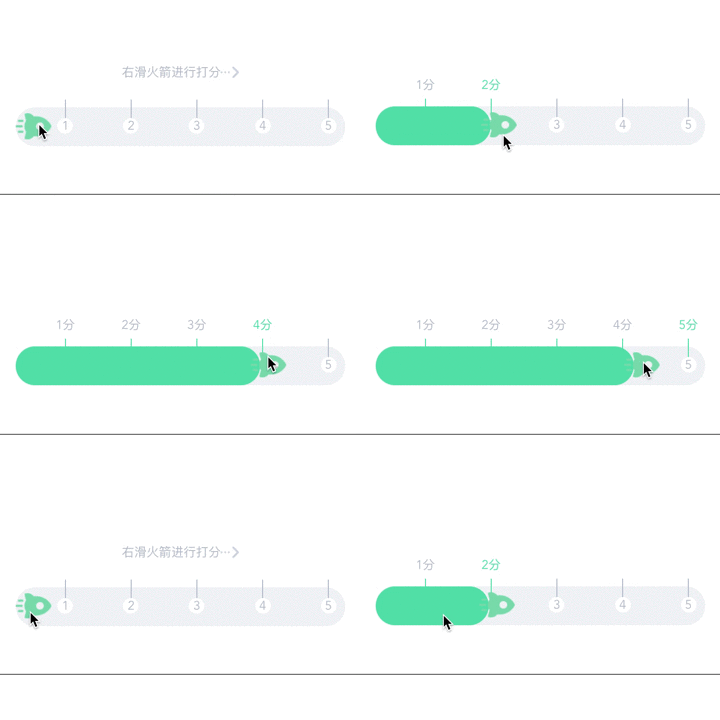
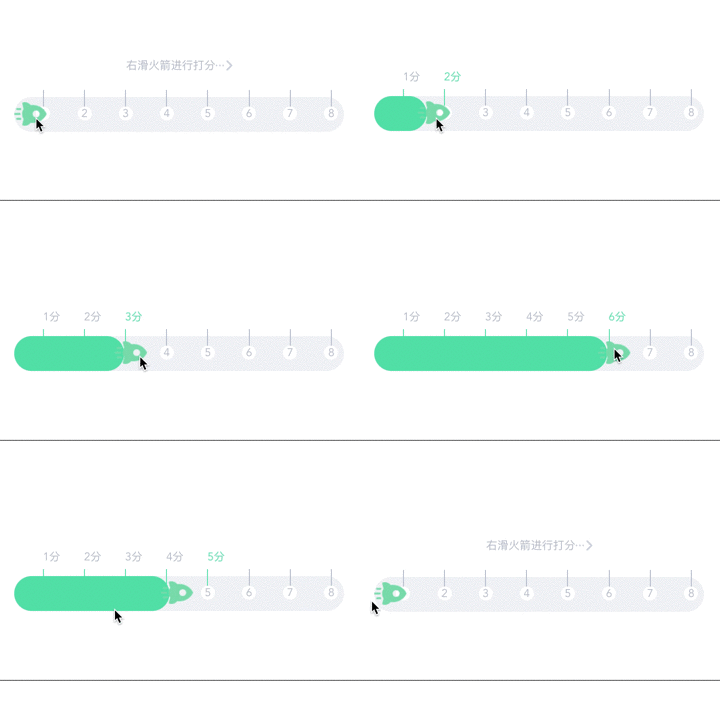
效果图:

父组件自定义设置打分

长度为4的分数组:

1
2
3
4
5
6
7
8
9
10
11
12
13
14
15
16
17
18
19
20
21
22
23
<template>
<div id="app">
<router-view :scores='scores' :liStyle='liStyle' :percent='percent'></router-view>
</div>
</template>

<script>
export default {
name: 'app',
data: function () {
return {
//分数数组
scores: [1,2,3,4],
//li宽度跟随分数数量
liStyle: {width: '25%'},
//小数点形式百分比,because在计算的时候直接用百分比不支持
percent: 0.25,
//分数刻度右移的距离,liStyle.width的1/5
left: {left: '5% '}
}
}
}
</script>

效果图:

长度为8的分数组:

1
2
3
4
5
6
7
8
9
10
11
12
13
14
15
16
17
18
19
20
21
22
23
<template>
<div id="app">
<router-view :scores='scores' :liStyle='liStyle' :percent='percent' :left="left"></router-view>
</div>
</template>

<script>
export default {
name: 'app',
data: function () {
return {
//分数数组
scores: [1,2,3,4,5,6,7,8],
//li宽度跟随分数数量
liStyle: {width: '12.5%'},
//小数点形式百分比,because在计算的时候直接用百分比不支持
percent: 0.125,
//分数刻度右移的距离,liStyle.width的1/5
left: {left: '2.5% '}
}
}
}
</script>

效果图:

小总结

关于整体风格颜色的更改没提出来,开始是觉得这个得跟着改图片,想想,其实图片的地址倒是可以跟着颜色一起做为父组件参数传递的,最后再说下不足点,不适用于在宽度很小的元素下放很多的分数刻度,刻度之间会距离很小的,会导致难以操作